Inventory Optimization Guide for Low-Volume Production
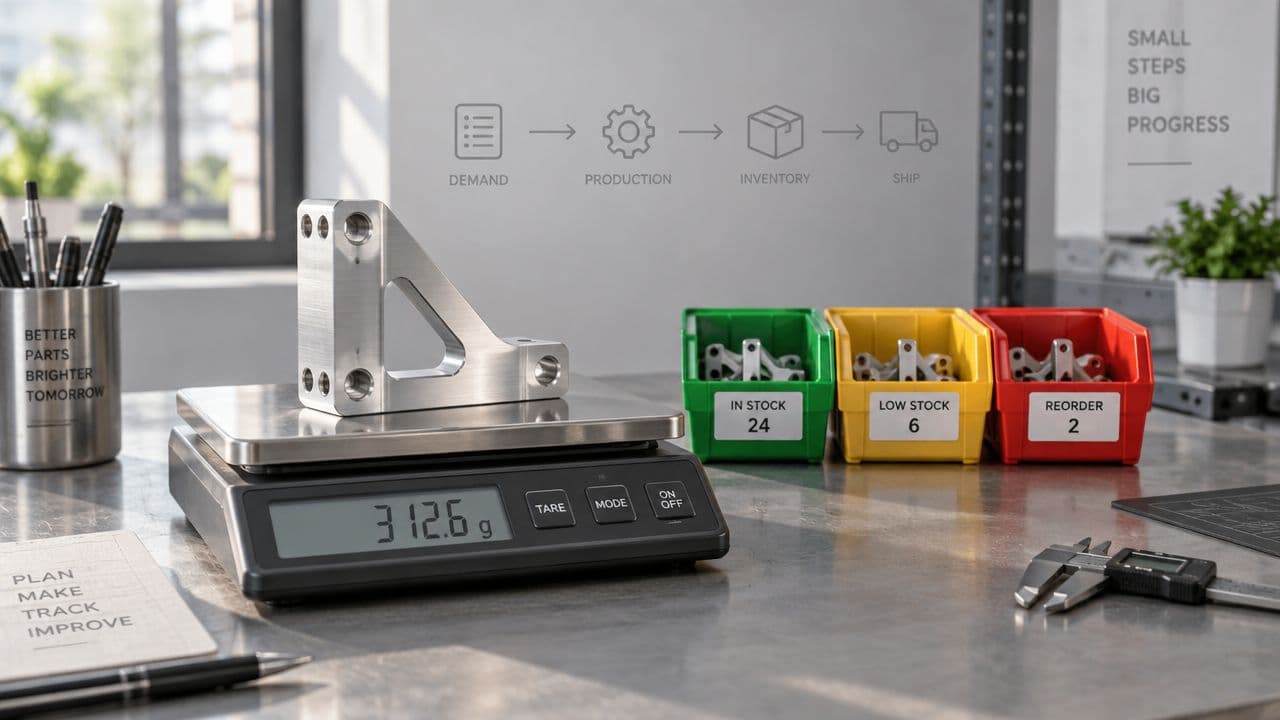
You're staring at a rack with a few critical brackets, two partially kitted prototype builds, and a planner who's already answering Slack messages about missing fasteners. The parts list keeps changing, the supplier quotes are fresh but not always stable, and nobody wants to discover a shortage after a machine is booked and the technician is waiting.
That's where inventory optimization earns its keep in low-volume manufacturing. The point isn't to squeeze inventory to the lowest possible number, it's to keep the right parts, in the right form, in the right place, so engineering can build, test, and iterate without burning time on expedites and manual chasing.
Table of Contents
- What Inventory Optimization Means in Low-Volume Manufacturing
Why low-volume work breaks textbook rules
Core Models and Formulas You Actually Need- The running example
Five Tactics for Low-Volume and High-Mix Environments- When each tactic earns its place
An Implementation Roadmap for Engineering and Operations Teams- Fix the data before the software
Software, Integration, and the AI Adoption Reality- What the stack needs to connect
KPIs and a Worked Safety Stock Calculation- A calculation you can reuse
Prototyping Case Examples and Supplier Recommendations
What Inventory Optimization Means in Low-Volume Manufacturing
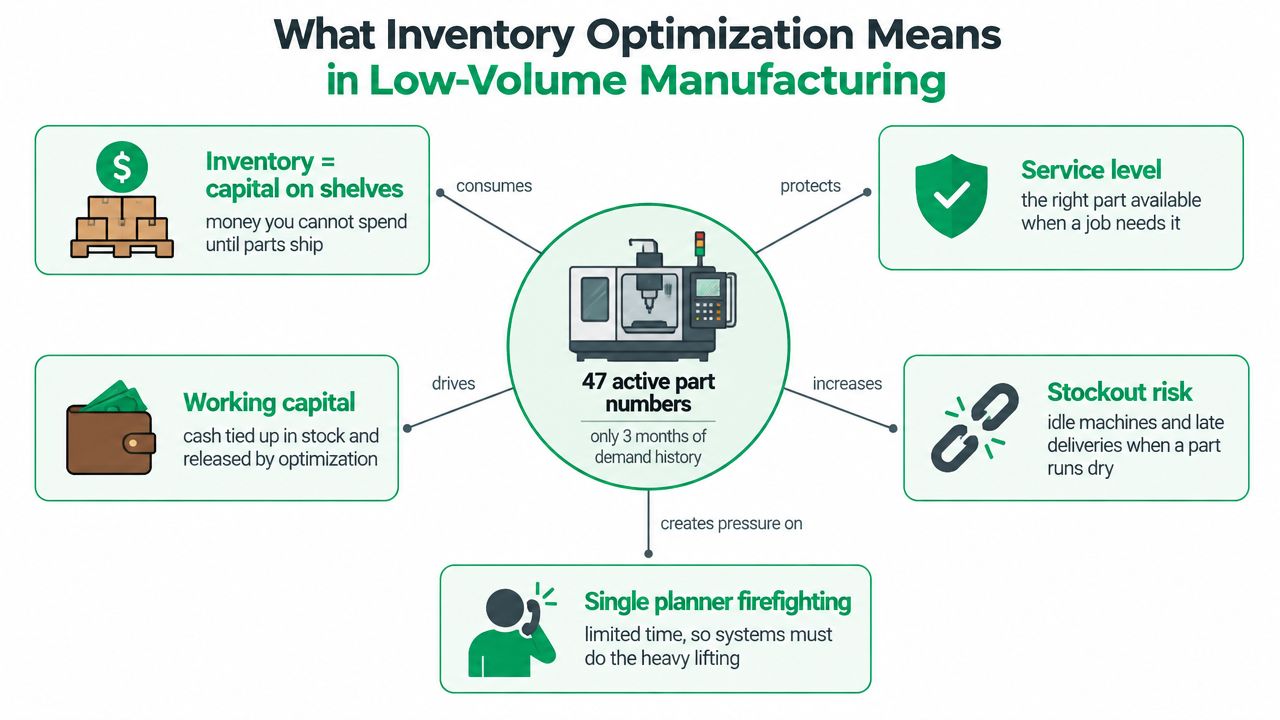
At a prototype CNC shop, the inventory problem looks nothing like a retail warehouse. You might have 47 active part numbers, only a short history of demand, and one person trying to keep raw stock, WIP, and purchased components aligned while the next design revision is already in motion. The hard part isn't just “how much should we buy”, it's deciding how much uncertainty the team can absorb before a job slips.
Think of the plumber's truck. If it's packed with every fitting imaginable, the plumber wastes cash and space. If it's nearly empty, every visit turns into a second trip, and the customer waits. Inventory optimization is the discipline of finding the middle ground, where the truck carries enough to finish the job without turning the truck into a rolling warehouse.
Why low-volume work breaks textbook rules
Most textbook inventory models assume stable, repeating demand and clean replenishment cycles. Prototype work doesn't behave that way. One week a bracket is needed for five builds, the next week it's frozen, and two weeks later engineering changes a hole pattern and half the stock is suddenly wrong.
Practical rule: in low-volume manufacturing, the target isn't minimum inventory. It's minimum disruption.
That's why the goal should include more than raw material on shelves. A healthy policy may hold raw stock for machining, WIP for jobs already started, and consigned material when the supplier can absorb part of the working capital burden. Sometimes the right answer is to accept a slightly higher unit cost if it cuts lead-time exposure and keeps builds moving.
For shops like the ones FIRMFG supports, this also means inventory policy has to respect manufacturing reality. A shop doing CNC prototyping, finishing, and low-volume production can't treat every part the same way, because a long-lead machined housing, a quick-turn fixture plate, and a repeat fastener kit don't carry the same risk. More on the production side of that trade-off is captured in FIRMFG's low-volume CNC machining overview.
The historical roots of the field matter because they explain why the math still shows up everywhere. The Economic Order Quantity model dates back to 1913, with later milestones like the Wagner-Whitin model in 1958 and Clark-Scarf's serial stochastic inventory systems in 1960, and IBM released one of the first computerized inventory management and forecasting systems in 1967. Those milestones built the basic logic that modern inventory optimization still uses, even when the tooling is much more advanced (historical inventory optimization timeline).
Core Models and Formulas You Actually Need
Start with the demand pattern, because it drives everything else. In prototype work, demand is often lumpy, not smooth, so you need a model that respects variability before you worry about ordering formulas. For a 6061 aluminum bracket used across five prototype builds, the first thing to look at is how demand moves over time, then how long suppliers take to respond.
The running example
Assume the bracket averages 18 units per week, with a weekly standard deviation of 7 units, and the supplier lead time is 14 days with 3-day variability. In plain English, the part is used often enough to matter, but not so predictably that you can trust a single average. That's the exact kind of part that causes trouble when a shop guesses instead of modeling.
Safety stock handles the demand uncertainty during lead time. A simple form is:
SS = Z × σLT
Where Z is the service factor and σLT is demand variability over the lead time window. If your demand variation is daily or weekly, lead time stretches that variation across more days, so uncertainty compounds instead of staying flat.
Lead time doesn't just delay replenishment. It multiplies forecast error.
The reorder point follows naturally:
R = D̄ × L + SS
Here, D̄ is average demand per time period and L is lead time in the same time unit. For the bracket example, that gives you the baseline level where you want to trigger a reorder before stock gets too thin.
EOQ still has value as a sanity check, even in low-volume work. It tells you whether a proposed order quantity is wildly too small or too large relative to ordering and holding costs. In prototype environments, EOQ often won't be the final answer, but it helps you see whether a supplier minimum or a batch size is distorting the plan.
Kanban sizing is the last check, not the first one. If you use containers, the key question is whether the container size fits the actual consumption cadence. A one- or two-piece lot may make visual replenishment awkward because the loop is too small to absorb variability, and the card system can become noise instead of control.
| Model | Formula | Bracket Example Result |
|---|---|---|
| Safety stock | SS = Z × σLT | Buffers the bracket against lead-time demand swings |
| Reorder point | R = D̄ × L + SS | Triggers replenishment before stockout risk rises |
| EOQ | Balance ordering cost and holding cost | Sanity check, not the main policy driver |
| Kanban size | Container demand × number of cards | Best only when replenishment is repetitive enough |
Five Tactics for Low-Volume and High-Mix Environments
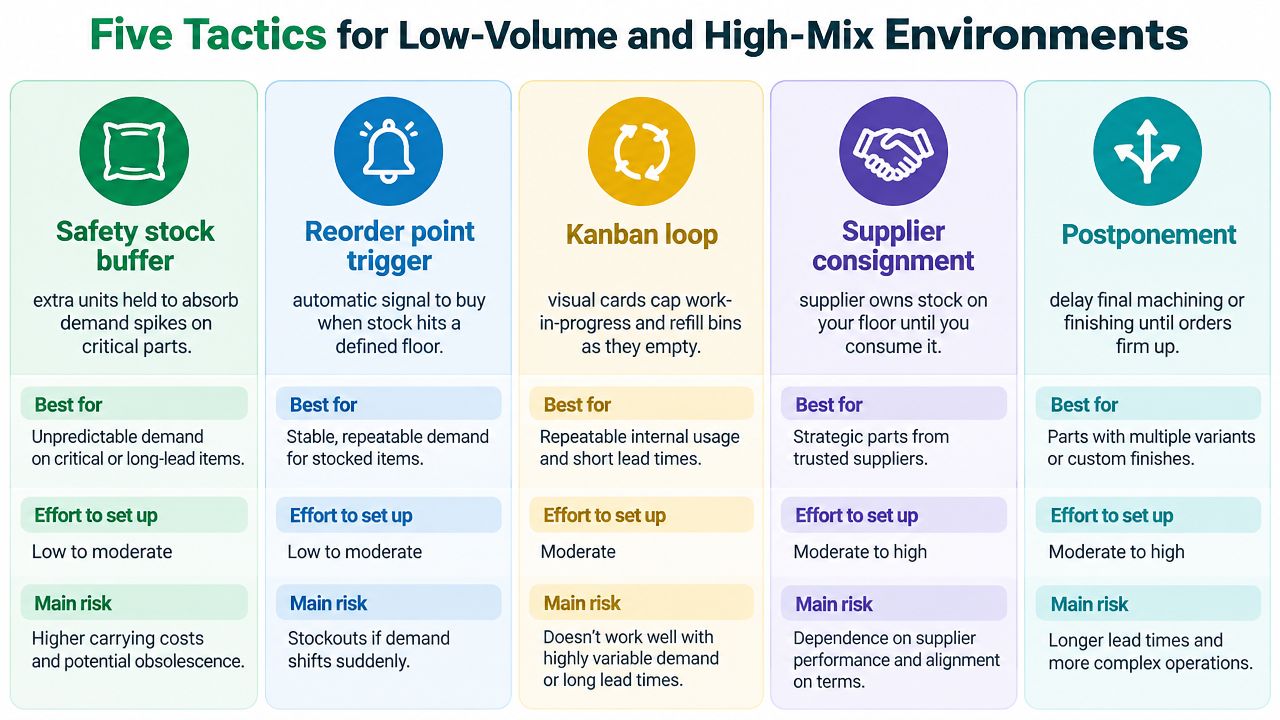
The mistake many teams make is treating every inventory control method as if it sits on one scale from “light” to “heavy.” In low-volume, high-mix manufacturing, that framing breaks down. Safety stock, reorder points, kanban loops, supplier consignment, and virtual inventory each solve a different problem, and they fail in different ways.
When each tactic earns its place
Safety stock buffers work best for parts that block builds. If one gasket or bracket stops a full prototype run, a small buffer is often cheaper than the lost day of engineering time. The burden is that someone has to review the buffer when design revisions hit, because a part that was critical last month may be obsolete now.
Reorder point triggers help when a small team needs the system to signal replenishment automatically. They're a good fit for parts with enough consumption history to justify a floor level, but they still need policy maintenance when BOMs change. In prototype work, the failure mode is stale parameters, not bad math.
Kanban loops make sense when a part moves repeatedly through the same consumption path. They're less useful when lot sizes are one or two, because you can't reuse containers efficiently and the visual board starts to lie. That's why kanban is stronger for stable support materials than for highly unique prototype components.
Practical rule: if the part changes faster than the replenishment loop, kanban becomes theater.
Where working capital shifts
Supplier consignment is a finance tactic as much as an operations tactic. It shifts stock ownership toward the supplier until you consume it, which can be useful for long-lead or expensive items. The trade-off is control. If your MES visibility is weak, consignment can hide shortages until they're already hurting the build.
Virtual inventory is often the strongest fit for low-volume shops that can't justify large buffers themselves. Shared forecasts and supplier-managed stock let you behave as if you held inventory without fully funding it on your own floor. The catch is trust, data discipline, and a supplier that can respond when the forecast changes.
A useful shortcut comes from FIRMFG's just-in-time and agile production discussion: use the lightest tactic that still protects the build, then add a second tactic only when the first one can't absorb the volatility. In practice, that usually means pairing a small safety buffer with reorder-point control, or pairing virtual inventory with a narrow consignment set for the most time-sensitive parts.
An Implementation Roadmap for Engineering and Operations Teams
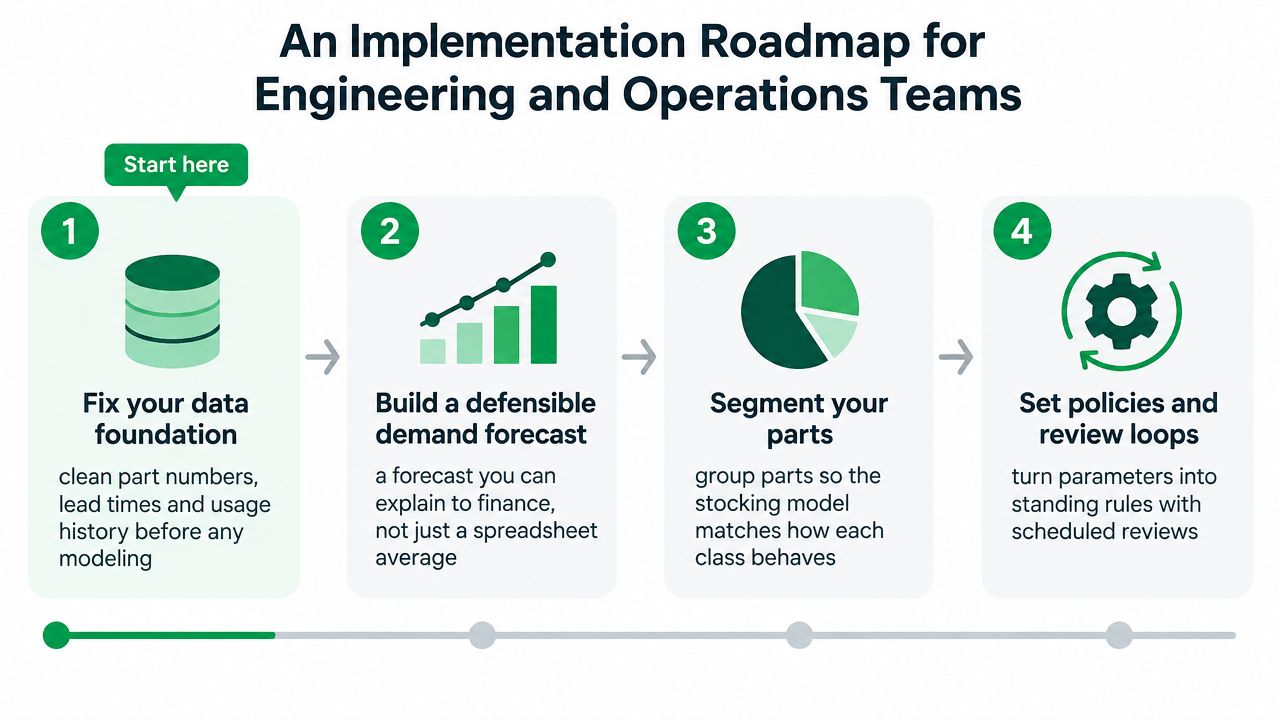
The best inventory policy falls apart if the data is messy. Clean part numbers, stable lead times, and trustworthy usage history come first, because no model can rescue bad inputs. In a prototype environment, the most common failure is trying to automate before the bill of materials is clean enough to trust.
Fix the data before the software
You need three things in usable shape. Part numbering should be consistent, lead times should be tied to real supplier performance, and demand history should reflect actual consumption, not just purchase orders sitting in a queue. If engineering uses one naming convention and procurement uses another, the model will look polished and still make bad calls.
Build a forecast you can defend
A simple moving average can work for smooth items, but prototype demand is often intermittent, so the forecast has to acknowledge gaps. Croston-style logic is often a better fit for items that appear in bursts, because it separates how often demand happens from how much arrives when it does. Finance will accept a modest model if the logic is transparent and the exceptions are visible.
Segment parts by behavior, not by habit
Group parts by demand pattern and lead-time risk. A 3D-printed jig bracket, a machined housing with a long supplier lead time, and a fastener kit don't belong in the same policy bucket. Once you segment that way, the inventory rules become much easier to defend in a review meeting because each class has a clear operating purpose.
Checkpoint: if you can't explain why two parts sit in different classes, your segmentation isn't ready.
Turn policy into process
The last step is tooling. That can mean spreadsheets for a tiny shop, standalone inventory software for a growing prototype team, or ERP and MES modules once work orders, routings, and inventory all need to talk to each other. Buying software before the data and policies are defined usually just moves the confusion into a prettier interface.
A practical readiness test is simple. Can your team clean the master data, explain the forecast method, agree on part classes, and review exceptions on a schedule? If not, the implementation is still in planning, no matter what the dashboard says.
Software, Integration, and the AI Adoption Reality
The right software tier depends on how many part numbers you're managing and how tightly inventory has to link to execution. Spreadsheets and shared BOM files can work for very small prototype flows, but they break down when multiple people are changing the same assumptions. Standalone inventory tools help, but once inventory has to follow work orders and routings, ERP and MES modules usually become the cleaner path.
What the stack needs to connect
Inventory can't live in isolation if the shop wants reliable control. It needs to connect to CAD and BOM data, MRP signals, supplier portals, and shop-floor transactions so the part status reflects reality instead of yesterday's update. That integration matters even more in low-volume manufacturing because every exception is visible and every missing line item can stall a build.
The adoption gap is real. A 2026 survey of 400 businesses found 81.2% AI interest, but adoption was still near zero, and a 2026 supply-chain planning benchmark showed 29% of SMBs using general-purpose AI tools, 22% using purpose-built vendor tools, and 53% planning to increase AI investment this year (state of inventory management 2026). That gap says more about operational readiness than model quality.
Practical rule: start with forecasting and exception alerts before you buy anything that claims to “autonomously optimize” inventory.
What to ask before you automate
For small manufacturers, the most useful AI features are usually boring ones first. Forecast support, anomaly detection, and reorder alerts can remove manual chasing without taking control away from the planner. Generative or agentic features can wait until the data is clean, the exception rules are stable, and the team trusts the outputs enough to act on them.
There's also a useful threshold effect in practice. Around 50 active part numbers, a parallel spreadsheet often turns into a coordination problem rather than a planning tool, especially if the same part appears in multiple builds and revisions. At that point, ERP-native inventory logic usually beats a side file because it keeps the transaction, the requirement, and the replenishment rule in one place.
| Tier | Best For | Integration | AI Readiness |
|---|---|---|---|
| Spreadsheet and shared BOM files | Tiny prototype teams | Low, manual handoffs | Low |
| Standalone inventory tool | Small shops needing order discipline | Moderate, supplier and stock sync | Moderate |
| ERP and MES modules | Higher part counts and work-order control | High, tied to execution | Higher, if data is clean |
KPIs and a Worked Safety Stock Calculation
Low-volume teams need a smaller KPI set than large plants, but the metrics have to be the right ones. Service level by part class matters more than raw turnover for slow movers, because a single missing component can stall a build. Inventory turns, days of supply, forecast bias and MAPE, and stockout incident rate round out the picture because they show whether the policy is serving the schedule or just looking tidy on paper.
A calculation you can reuse
Use the standard safety stock form:
Safety stock = Z × σd × √LT
If the target service level is 95%, then Z = 1.65. If demand variability is 12 units per week and lead time is 3 weeks, the calculation becomes 1.65 × 12 × √3, which gives roughly 34 units of safety stock. That number only makes sense if the forecast, lead time, and demand volatility inputs are current.
Which KPI drives which choice
- Service level by part class: set the protection target based on how badly a shortage would hurt the build.
- Inventory turns: use carefully, because a low-turn prototype part can still be the right stock decision.
- Days of supply: watch this when suppliers are erratic or engineering changes are frequent.
- Forecast bias and MAPE: use these to see whether the planner is consistently overordering or underordering.
- Stockout incident rate: track every time a job waits on a missing part, because that's the operational pain point.
A calculated safety stock number shouldn't be sacred. Override it when a part is at risk of revision, when a supplier has a history of unstable lead times, or when the component is cheap but the line stoppage would be expensive. The number is a starting point, not a substitute for engineering judgment.
Prototyping Case Examples and Supplier Recommendations
A five-SKU pilot is a good way to make the policy real. One team running repeated design changes on a bracket family used a small safety stock plus reorder points, and the value wasn't just fewer shortages, it was fewer interruptions while engineering kept tweaking the design. The tactic worked because the team treated the parts as build enablers, not just line items in a system.
The second pattern shows why consignment can matter in low-volume work. A long-lead CNC component sat on call at the supplier's side of the arrangement until the build consumed it, which reduced the pressure to fund dead stock on the shop floor. That model fits prototype work when the part is expensive, the usage is sporadic, and both sides can trust the data.
For teams sourcing this kind of work, FIRMFG's rapid prototyping examples are a useful reference point because the inventory question is always tied to iteration speed. Prototype suppliers should be evaluated on more than price.
| Case scenario | Inventory tactic applied | Supplier capability needed | Result |
|---|---|---|---|
| Five-SKU prototype pilot | Safety stock and reorder point | Fast quoting, stable lead times, change-order handling | Fewer shortages during design changes |
| Long-lead CNC component | Supplier consignment | Trust, traceability, scheduled replenishment | Lower working-capital exposure |
| Mixed prototype and bridge builds | Virtual inventory plus review loop | Forecast sharing, responsive communication | Better alignment between builds and supply |
Look for quoting speed, DFM feedback, willingness to support low-MOQ consignment, and enough traceability to keep revision control intact. A supplier that can support virtual inventory or a simple kanban loop is usually easier to work with than one that only sells parts. For low-volume teams, responsiveness often matters more than theoretical efficiency because every delay shows up directly on the build calendar.
If your team is trying to tighten prototype inventory without creating more planner chaos, FIRMFG can support that conversation with CNC prototyping, low-volume production, DFM feedback, and short-lead part supply that fits iterative work. Visit FIRMFG to discuss how your parts, lead times, and build cadence can be matched to a practical inventory policy.