Indexable End Mill vs Solid Carbide: Selection Guide
The cheapest insert rarely makes the cheapest part. That's the idea most buying advice gets backwards. A low cost per insert looks good on a purchase order. It tells you nothing about indicating time, scrap on a tolerance feature, or what happens when runout kills the second edge the same way it killed the first. Judge an indexable end mill by cost per finished part, and diagnose the setup before you blame the grade.
Table of Contents
How Insert Geometry Controls Force and Stability- Edge Radius and Rake Angles
Choosing Insert Grades and Geometry by Material- Easy Materials Still Punish the Wrong Edge
Starting Cutting Parameters by Material- How to Use the Table Without Getting Burned
Cost per Part Rather Than Cost per Insert- The Worksheet Lines That Actually Matter
Application Examples for Prototypes and Short Runs- Large 6061 Aluminium Mounting Plate
Diagnosing Early Failure Before Changing Insert Grade- The Diagnostic Sequence
Decision Rule, Exceptions and Trial Cut- The Either-Or Rule
Indexable End Mill vs Solid Carbide at a Glance
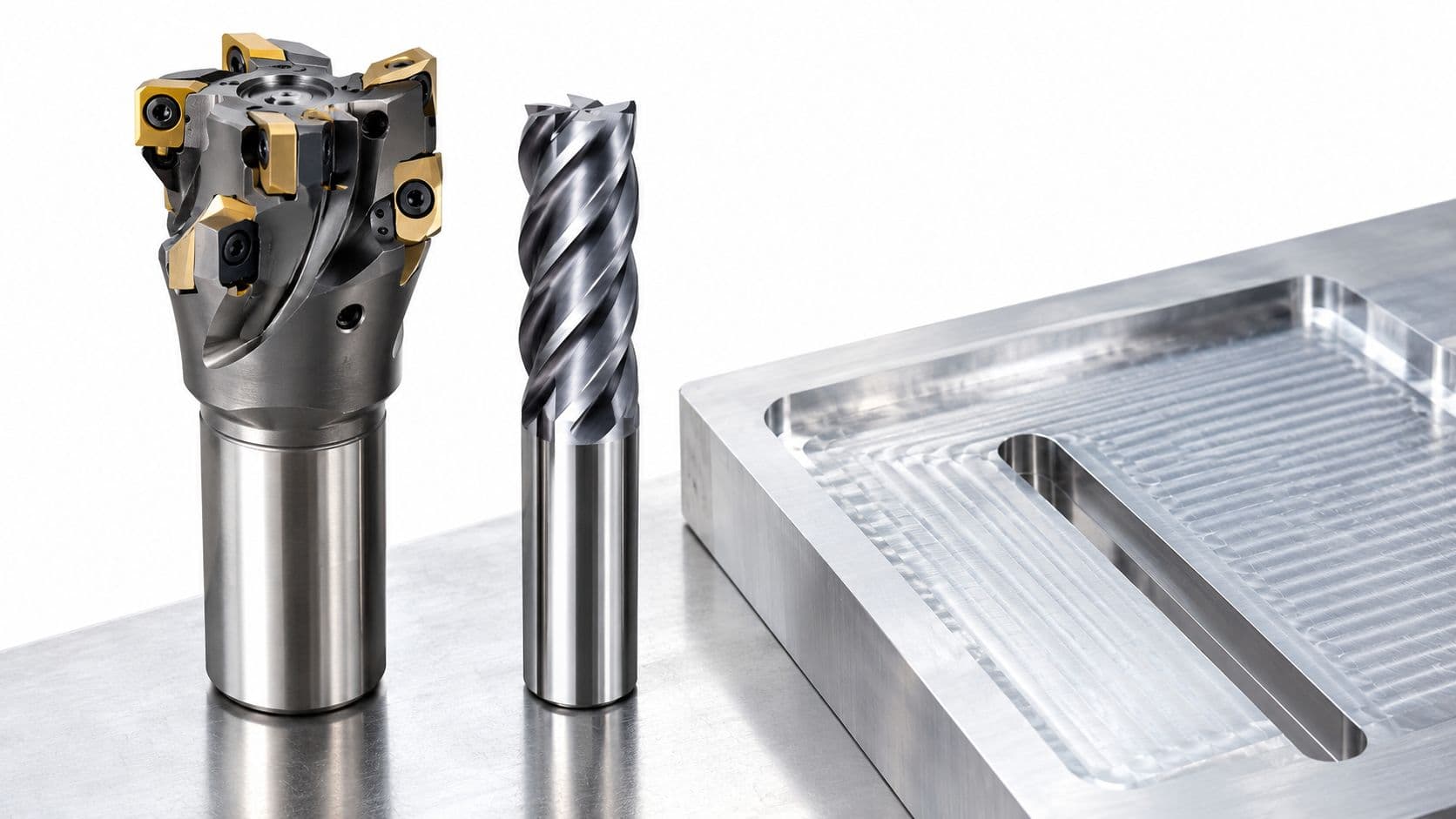
Indexable tooling wins when you're removing large volumes with a large, rigid cutter. Solid carbide wins when reach, rigidity, and tolerance matter more than body price. That's the short answer.
Indexable cutters become most attractive above about 25 mm (1 in) diameter, especially for roughing and semi-finishing at higher volumes. Below that size, the pocket, screw, and clamp hardware eat the space a solid flute would use. The lower body price also isn't the whole price. You still buy inserts, spare screws, and sometimes several insert geometries for one body.
| Criterion | Indexable end mill | Solid carbide end mill |
|---|---|---|
| Typical diameter range | Most economical from about 25 mm (1 in) upward | Common across small and medium diameters |
| Upfront cost | Lower body price, plus insert or head purchases | Higher price for the whole tool |
| Cost per cutting edge | Low once the body is amortised, depends on edges per insert | Full tool cost spread over its resharpenable life |
| Rigidity | Insert pocket and clamp add a runout path | Single body, typically stiffer |
| Runout sensitivity | High, depends on seating and pocket cleanliness | Low, set in manufacture |
| Small features and thin walls | Body often too large to enter | Better access and reach |
| Titanium and Inconel | Insert runout can shorten life | Often the more reliable choice |
| High-volume roughing | Strong performance and fast edge change | Adequate, usually not the first choice |
| Reconditioning | Index or replace inserts in minutes | Regrind or replace the whole tool |
The Three Conditions That Decide Most Jobs
First, cutter diameter. If the feature won't admit a body in the economical size range, the argument ends. Second, reach. Deep pockets, small internal radii, and thin walls punish a bulky body and reward a solid tool that can get in without rubbing. Third, material. Heat and runout sensitivity change the ranking fast, particularly in high-temperature alloys.
Treat the table as typical behaviour, not a guarantee. A specific catalogue tool can break the pattern. That's why the trial cut at the end matters more than any general rule, including this one.
How Insert Geometry Controls Force and Stability
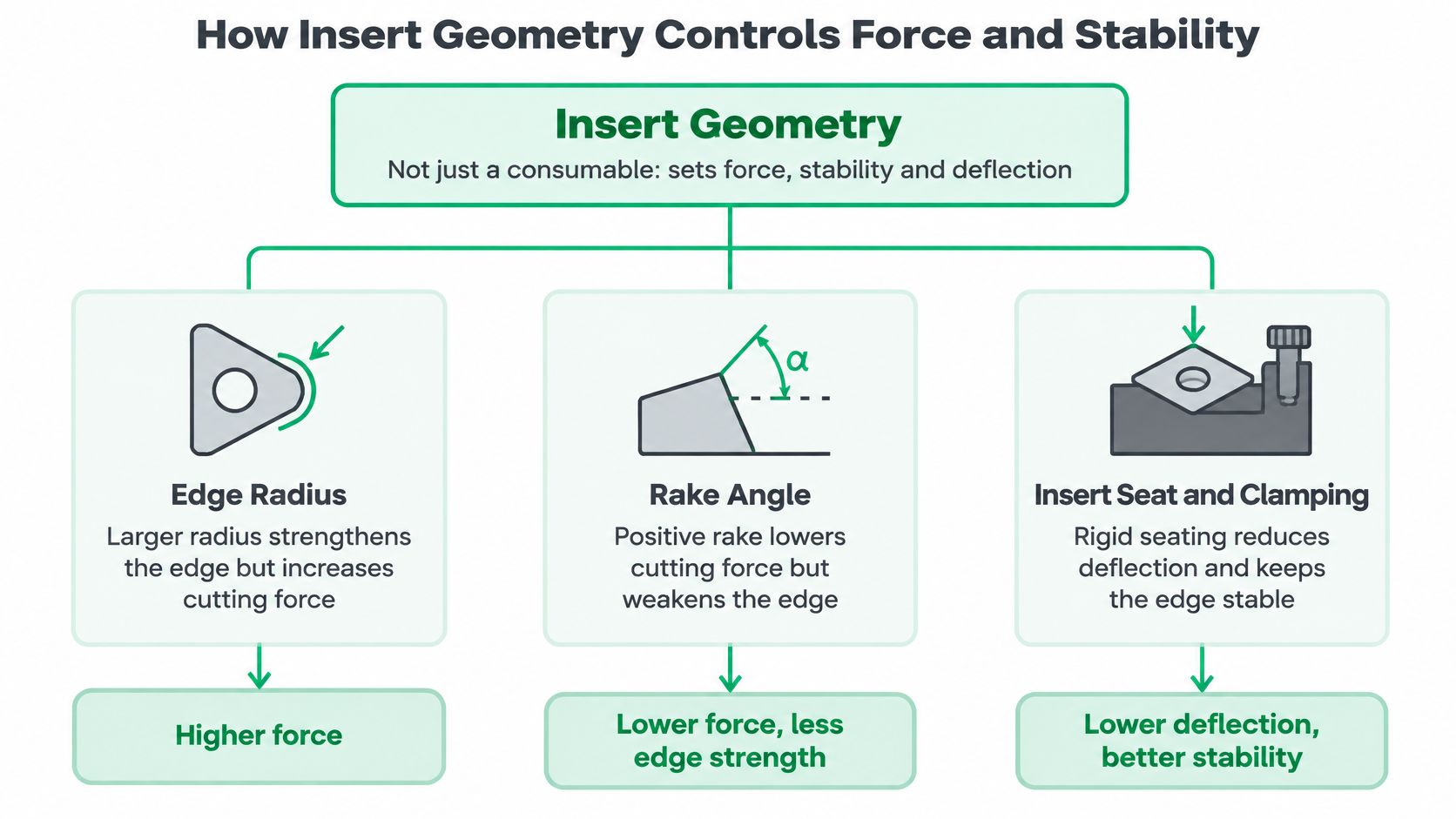
An insert isn't just a wear part you swap when it dulls. Its geometry sets cutting force, stability, and deflection, so the same body can behave like two different tools.
Experimental work on indexable-insert plunge milling in Ti-6Al-4V quantified how edge radius, axial rake, radial rake, entering angle, and nose radius affect tangential, radial, and axial forces. The practical lesson is simple. Change the insert, and you change spindle load, deflection, and material removal rate even at the same cutter diameter.
Edge Radius and Rake Angles
A larger edge radius strengthens the edge. It also increases ploughing and force, because more material gets pushed rather than sheared. On a rigid setup in an interrupted cut, that trade can be worth it. On a thin wall, the extra force can deflect the part before the edge ever chips.
A more positive axial rake reduces cutting resistance and helps chips flow up and away. The cost is edge strength. Radial rake changes chip flow direction and how load builds as the insert enters the cut. Positive geometry cuts freer. It also tolerates a bad entry or a hard spot less well.
Entering Angle and Nose Radius
Entering angle redistributes force between radial and axial components. That redistribution affects deflection, burr formation at exit, and how the surface is generated. If a wall keeps pushing away, look here before you blame feed.
Nose radius spreads load over more edge. A larger radius can improve stability and finish, but it also changes the corner you can produce. Don't select it for finish alone if the drawing needs a tighter internal radius.
Practical rule: Start with a honed edge for titanium and interrupted cuts, and a sharp, positive edge for aluminium, plastics, and finishing passes.
Insert shape follows the job. Square inserts suit shoulders and slots and give a strong edge count. Round inserts handle ramping and contouring well at high feed because there's no weak corner. Triangular inserts cover general facing and milling. 80 degree diamond inserts help where access is limited and a square corner can't reach.
Check every choice against the supplier catalogue for the specific insert code. Geometry names sound similar across brands. The actual rake, hone, and chipbreaker often aren't.
Choosing Insert Grades and Geometry by Material
The lowest-cost insert can produce the highest cost per part if its edge smears, chips, or forces a slow cut. Match grade and geometry to the material first, then choose the cutter format. The overview of materials for CNC machining covers broader material selection; the table narrows the choice to insert starting points.
| Material | Grade and coating | Geometry bias | Tool choice |
|---|---|---|---|
| Aluminium 6061, 7075 | Uncoated carbide or PCD, sharp | Highly positive, generous chip gullets | Indexable for large faces, solid carbide for detail |
| Mild and alloy steel (1018, 4140, A36) | PVD-coated carbide (TiAlN or AlTiN family) | Medium positive, lightly honed | Indexable for roughing, solid carbide for finishing |
| Stainless steel (304, 316) | Tough coated carbide | Positive, keep chip load up to limit work hardening | Indexable for open roughing, solid carbide for tight features |
| Titanium Ti-6Al-4V (Grade 2, Grade 5) | Fine-grain carbide, uncoated or coated | Positive geometry, light hone, light engagement | Solid carbide preferred; indexable only with a rigid setup |
| Inconel and high-temperature alloys | Coated fine-grain carbide | Stable geometry, lower rake | Solid carbide preferred |
| Engineering plastics (POM, PC, acrylic) | Uncoated carbide or PCD | Sharp, highly positive | Either; indexable suits large plates |
Easy Materials Still Punish the Wrong Edge
Aluminium 6061 and 7075 need a sharp, highly positive edge. A heavily honed steel geometry can rub, build up edge, and damage the finish. Chip space matters as much as grade because aluminium produces chips quickly.
Mild and alloy steels, including 1018, 4140, and A36, suit indexable end mills for roughing. A PVD-coated grade with a light hone can handle entry and exit while retaining a reasonably sharp edge. Stainless 304 and 316 call for a tough grade and positive geometry. Keep chip load high enough to cut beneath the work-hardened layer rather than rub across it.
Where Solid Carbide Takes Over
Titanium and Inconel concentrate heat at the leading edge, and runout can leave one insert carrying more load than the others. For titanium, start with positive geometry, a light hone, and light engagement. That follows the practical rule for titanium and interrupted cuts. A solid carbide tool is often the more reliable starting point; use an indexable cutter when the setup is rigid and the cutting conditions suit it. Inconel also favors a stable, lower-rake geometry and a cautious setup.
Engineering plastics such as POM, polycarbonate, and acrylic need a sharp, positive edge, much like aluminium. A dull or heavily honed edge can melt or smear the material instead of cutting cleanly.
A replaceable-head option sits between conventional indexable and solid tooling. In 2025, Paul Horn introduced an indexable-head PKD system for aluminium with a replaceable head, an intermediate sleeve for different cutting heights, and face and peripheral edges in a reported 2:1 ratio. For abrasive composites or production aluminium, the higher initial cost may pay off. For a short prototype run, it may add inventory without lowering cost per part. Treat the table as a grade-family guide, then check the supplier catalogue for the exact insert code and geometry.
Starting Cutting Parameters by Material
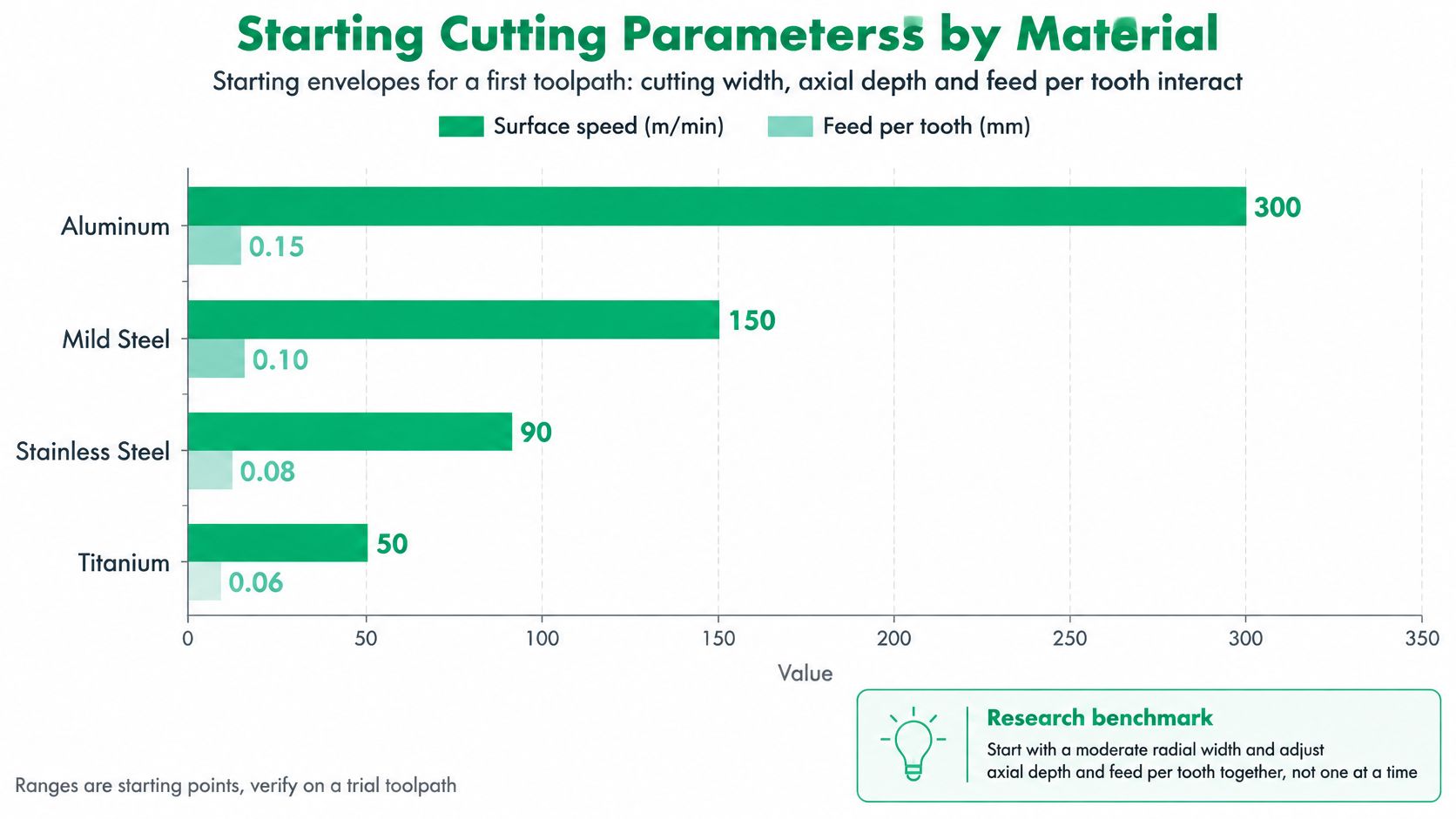
A cutting-speed chart is not a recipe. The useful starting point depends on the cutter, insert, material, and how much of the tool is engaged. Change one factor, and the load on the others changes too.
A study of single-tooth climb milling tested C45E medium-carbon steel with a 32 mm indexable shoulder mill with an XOMX10T308TR insert at 230 m/min, with engagement of 20% and 50%, axial depths of 2 mm and 4 mm, and feed per tooth of 0.095 and 0.2 mm/rev. Treat those values as a benchmark for that setup, not as a default for 1018 or A36. The cutter, insert, and engagement conditions limit how far the result transfers.
| Material | Cutting speed Vc (m/min) | Feed per tooth fz (mm/tooth) | Axial depth ap | Radial engagement ae |
|---|---|---|---|---|
| Aluminium 6061, 7075 | Use the specific insert manufacturer's catalogue | Use the specific insert manufacturer's catalogue | Set from the cutter and insert catalogue | Start with light engagement; confirm in the catalogue |
| Mild steel, C45E study benchmark | 230 m/min in the cited study | 0.095 or 0.2 mm/rev in the cited study | 2 or 4 mm in the cited study | 20% or 50% in the cited study |
| Mild steel, 1018 and A36 | Use the specific insert manufacturer's catalogue | Use the specific insert manufacturer's catalogue | Set from the cutter and insert catalogue | Set from the cutter and insert catalogue |
| Alloy steel, 4140 annealed | Use the specific insert manufacturer's catalogue | Use the specific insert manufacturer's catalogue | Set from the cutter and insert catalogue | Set from the cutter and insert catalogue |
| Stainless steel, 304 and 316 | Use the specific insert manufacturer's catalogue | Use the specific insert manufacturer's catalogue | Set from the cutter and insert catalogue | Start with light engagement; confirm in the catalogue |
| Titanium Ti-6Al-4V | Use the specific insert manufacturer's catalogue | Use the specific insert manufacturer's catalogue | Set from the cutter and insert catalogue | Start with light engagement; confirm in the catalogue |
| Inconel 718 | Use the specific insert manufacturer's catalogue | Use the specific insert manufacturer's catalogue | Set from the cutter and insert catalogue | Set from the cutter and insert catalogue |
The cited study reports feed per tooth in mm/rev. Its units are preserved above; do not treat that figure as interchangeable with mm/tooth without checking the study's definition and the cutter setup. For other materials, take speed and feed from the exact insert manufacturer's catalogue. Use its guidance for depth and engagement too. For aluminium and stainless, a sharp, positive edge and light engagement are sensible starting choices, but the catalogue and a controlled test determine the working values.
How to Use the Table Without Getting Burned
Raise radial engagement or axial depth cautiously. Both can increase cutting force; feed also affects productivity, finish, and insert loading. Log each test and change one setting at a time.
- Record spindle load for each pass.
- Note where vibration begins: entry, a corner, or full engagement.
- Measure the same feature after each test.
- Check finish where the drawing sets a requirement.
Compare those results with the setup: cutter runout, insert seating, workholding, and CAM engagement. Check those causes before blaming the insert grade.
Cost per Part Rather Than Cost per Insert
An insert's purchase price is only one line in the cost per part. Setup, indicating, inspection, and scrap all count. Calculate by part family, including how many edges hold size and finish. The same accounting applies across a job, as the breakdown of what drives CNC milling cost explains.
A 3/4-inch indexable end mill for APKT1003 inserts was listed at $289.95 in 2026 by Cutting Tool Tech. Treat that as a starting price, not a cost comparison. For a short batch, the body cost is spread across few parts, so setup and inspection can outweigh the insert savings.
The Worksheet Lines That Actually Matter
- Cutter body: Spread the price across expected cuts before pockets or screws wear out.
- Inserts or heads: Divide the price by usable edges that maintain size and finish, not the edge count printed on the package.
- Inspection time: Charge each setup for the minutes spent indicating inserts after indexing.
- Scrap risk: Include the cost of losing a part when an edge fails on a tolerance-critical feature.
- Changeover and inventory: Count the added stock of grades and geometries, plus the time needed to verify them.
For a batch of 40 steel parts, allocate body and insert cost across planned cuts and usable edges. Add indicating and inspection time for each setup at your shop rate. The inspection line can exceed the insert line.
A single bad edge on a tolerance feature can cost more than the insert itself.
Count usable edges only after checking the cost of bringing each one into line. A fresh edge may still need indicating, and pocket seating or runout can make the next edge perform differently from the last. Diagnose those conditions before blaming the insert grade. On long runs, body cost matters less per part, and consistent usable edges can make indexable tooling a better choice. On low-volume work, setup and inspection can dominate. A solid tool that loads predictably may cost less per finished part.
Compare the cost of the finished, inspected part, not the cutter's price or hourly rate alone. The cheaper-looking tool loses when it adds setup time, rejects, or unstable results.
Application Examples for Prototypes and Short Runs
Three jobs, three different answers. The decision rule only earns its keep when it survives real parts.
Large 6061 Aluminium Mounting Plate
The plate is open, flat, and bigger than the economical diameter threshold covered earlier. Rough it with an indexable face mill, then take a solid carbide finishing pass on the sealing face where flatness and finish are controlled. Watch the chip gullets. Aluminium makes chips fast, and recut chips will scar a face that was otherwise fine.
Ask which operation holds the tolerance. Here it's the finishing pass. The indexable tool's job is only to remove volume without leaving the finisher too much, or too uneven a load.
Ti-6Al-4V Bracket With Thin Ribs
This one's the opposite. The ribs can't take a large body, and they can't take the force a heavily honed insert generates. Go solid carbide, light radial engagement in the 5-20% range from the parameter table, and cutting speed in the 40-70 m/min range listed there.
Insert runout is the quiet problem in titanium. One high edge takes the extra load, overheats, and fails early, and the thin rib records every bit of it as deflection. Which operation holds the tolerance? Nearly all of them, because the ribs move. That alone rules the indexable body out.
4140 Steel Tooling Plate in a Batch of 40
Forty parts is enough to spread a body cost, but not enough to ignore setup time. Rough with an indexable cutter at 20-50% radial engagement, the benchmark range from the steel study cited earlier. Validate the first parameter set on a test piece before committing the batch.
Then run the worksheet from the previous section. Compare cost per finished part, including indicating time at each index, against a solid carbide alternative. On this batch size the indexable tool usually wins the roughing, and solid carbide still takes the final tolerance pass. Same question, same split. Volume removal and tolerance holding are different jobs.
Diagnosing Early Failure Before Changing Insert Grade
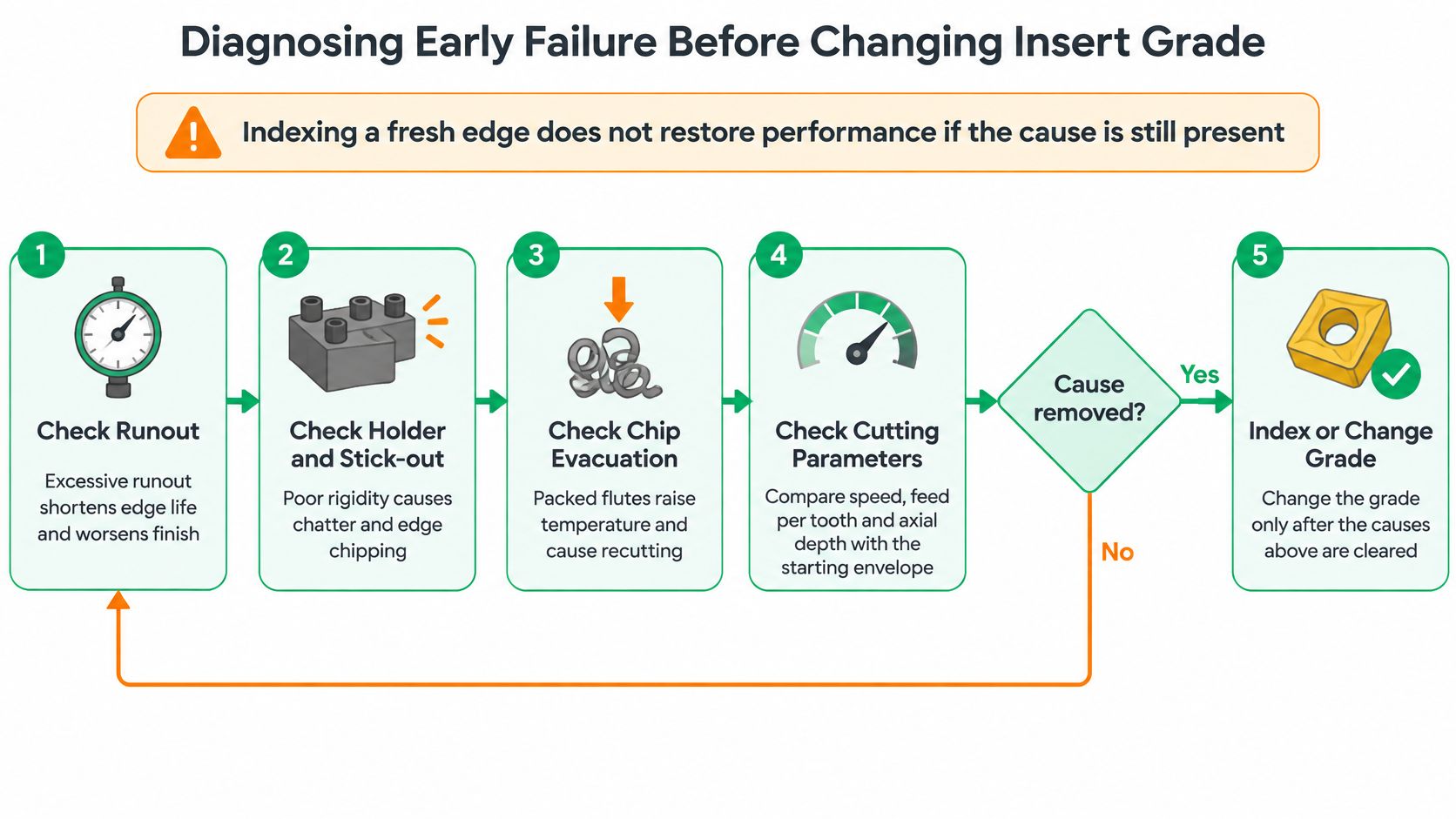
Indexing to a fresh edge doesn't restore performance if the cause is still in the setup. A dirty pocket will kill the new edge exactly the way it killed the old one. Grade is the last thing to change, not the first.
Common causes of short life and poor finish include excessive runout, poor clamping, insufficient chip load, excessive engagement, vibration, unsuitable grade, and recutting chips, with insert runout above 0.03 mm cited as a contributor to chatter. Coolant choice sits inside this picture too, and our guide to metal cutting coolants and chip evacuation covers that side in detail.
The Diagnostic Sequence
- Clean the pocket: Remove the insert, clean pocket and seats, and check for debris or a raised burr.
- Torque to specification: Refit and torque each screw, because clamping force sets seating.
- Indicate each insert: Measure runout edge by edge and compare it against that 0.03 mm practical threshold.
- Verify actual engagement: Check real radial and axial engagement against the CAM program, not the planned values.
- Inspect the chips: Thin, curled, or recut chips point to chip load or evacuation, not grade.
- Check rigidity: Spindle, holder stick-out, and workholding, in that order.
- Change grade or geometry: Only after the first six checks come back clean.
One guideline needs careful handling. Recommended face-mill engagement of roughly 70-80% of cutter diameter comes from the same practical guidance cited above. Treat it as an application-specific starting point, not a universal rule.
| Symptom | Likely cause | First check | Fix |
|---|---|---|---|
| Chatter marks on the floor | Insert runout or low rigidity | Indicate each insert, check holder and workholding | Reseat inserts, reduce engagement |
| Edge chipping within minutes | Insufficient chip load or hard spots | Measure chip thickness and inspect shape | Raise feed per tooth, check grade |
| Poor finish after indexing | Dirty pocket or uneven seating | Clean pocket and re-torque | Reseat, then re-measure the new edge |
| Short life in aluminium | Chips recut in the flute | Inspect chips for recutting | Improve chip clearing with air blast or minimum-quantity lubrication |
| Size drift or burr at exit | Actual engagement differs from CAM | Verify radial and axial engagement | Adjust toolpath and entering angle |
| Rising spindle load | Excess engagement or axial depth | Log spindle load per pass | Reduce radial engagement or axial depth |
Aluminium deserves a separate note. Air blast or minimum-quantity lubrication helps only if chips really leave the cut. Blowing chips back into the flute path makes recutting worse, not better.
Decision Rule, Exceptions and Trial Cut
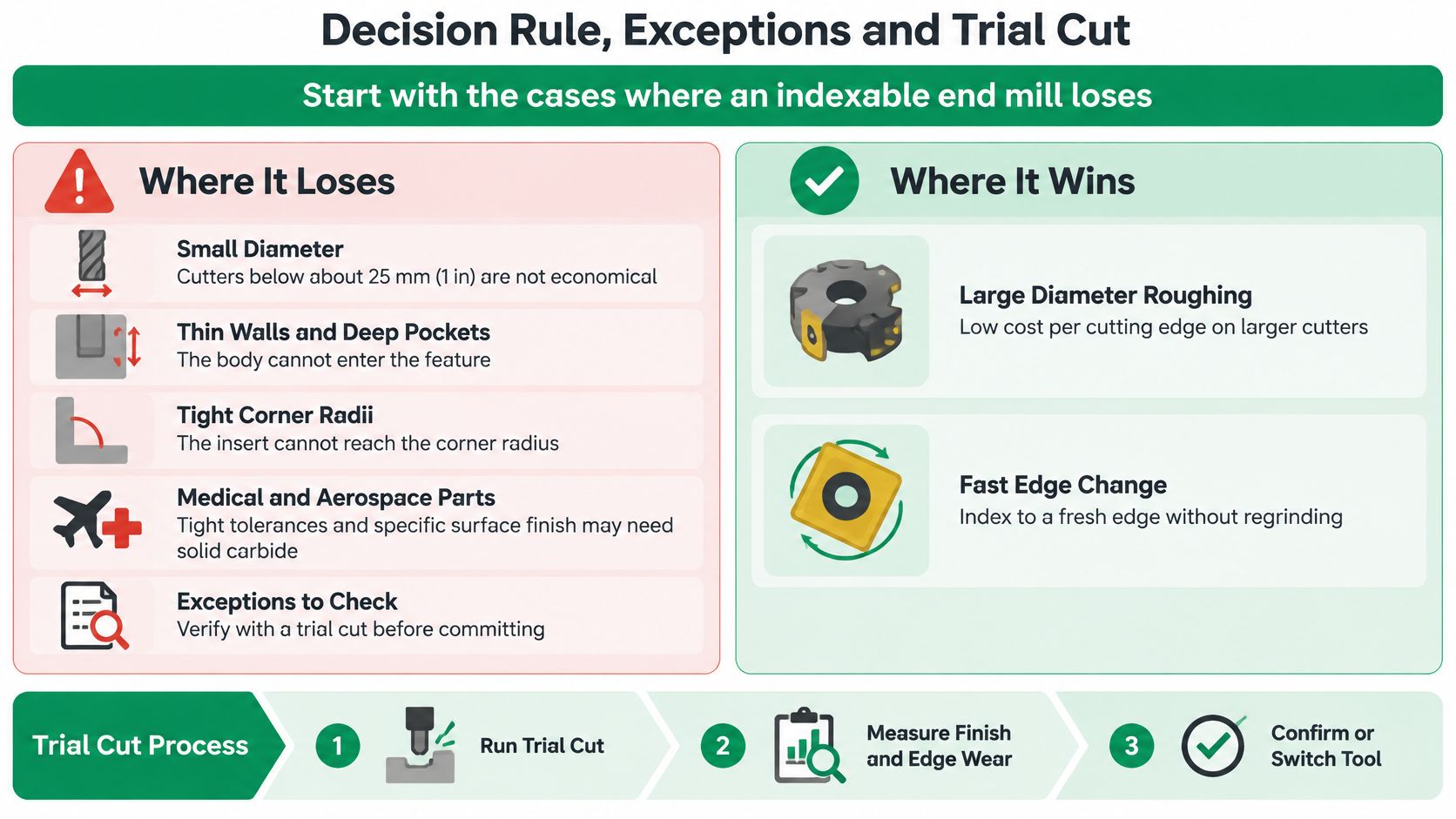
Start with where an indexable end mill loses. Small diameters below the economical range. Thin walls and deep pockets the body can't enter. Corner radii the insert can't reach. Medical and miniature parts that need a runout-free edge. Complex 5-axis geometry where insert reach limits access. And titanium or Inconel, where runout and heat shorten edge life.
The Either-Or Rule
The indexable option wins when the feature is large, access is open, the material is steel or aluminium, and the batch is long enough to spread body cost. The solid carbide option wins when the feature is small, the material is titanium or Inconel, or the final pass carries the tolerance.
When both sets of conditions show up on one part, split the work. Indexable roughing where access and rigidity allow. Solid carbide finishing on tolerance-critical features. Most real prototype work lands there, not at either extreme.
Before you commit: Check diameter, radial engagement, required corner radius, workholding rigidity, material, batch size, and surface-finish requirement, in that order.
Run the Trial on the Actual Part
Set up both candidates on the same feature, under identical workholding. Record spindle load, vibration, dimensional change, surface roughness, and how many edges hold size. Then price the result per finished part using the worksheet, not per edge.
That trial needs a machine that can reach the geometry in the first place. We offer 4-axis CNC machining for complex geometries and undercuts, and we have over 100 advanced CNC machines in-house, including 3-axis, 4-axis, and 5-axis machining centers. A prototype trial that mirrors production access tells you more in one setup than a week of catalogue comparison.
Pick the tool after the cut, not before it. The part doesn't care what the insert cost. It records force, runout, and heat, and so should you.
If you're weighing indexable roughing against solid carbide finishing on a prototype or short run, send us the part and we'll run the comparison as a trial cut, then price it per finished part rather than per insert. Visit FIRMFG to share your files and get a machining plan built around your material, tolerances, and batch size.